Vn5socks.net Review: Best Residential Proxy for Aged Account Warmup (2026)
Buying aged accounts is half the job. Running them from the wrong IP is how you burn a $50 aged Facebook account in the first login. The cookie looks clean, the fingerprint looks clean, the account has five years of organic history — and then you punch in from a datacenter IP and the checkpoint hits before the feed even loads.
What's in this guide

This is the single most underestimated failure mode in this industry. Accounts don't die from bad OpSec in isolation — they die from the mismatch between what the account is and what the network says it is. A 2019 Facebook account tied to a Jakarta SIM card, logging in from a Chicago AWS subnet, is not a user. It's a signal. Meta's risk engines are tuned to flag exactly that pattern, and they've been getting sharper every quarter.
For two years we've recommended residential proxies as the baseline infrastructure for anyone serious about keeping aged accounts alive long-term. After running tests across a dozen providers, we've partnered with Vn5socks.net and made them our default residential proxy recommendation. This is a full review of why, how to use them, and where they fit in a real multi-account operation.
Why Residential Proxies Matter for Aged Accounts
Every major platform fingerprints incoming connections at the IP layer before it even looks at your cookies or browser. The distinction that matters most is ASN-level: datacenter IPs (AWS, DigitalOcean, OVH, Hetzner) are tagged as commercial hosting, while residential IPs map to actual consumer ISPs (Comcast, Vodafone, Telkomsel, Jio).
 Datacenter IPs are flagged on sight. Residential IPs route through real consumer ISPs — invisible to platform risk engines.
When you log into a Facebook account from a datacenter ASN, the platform's risk engine runs an instant pattern match: is this IP block associated with scraping, automation, botnets, or VPN services? The answer is almost always yes. The outcome is a mandatory checkpoint, a phone re-verification, or an outright disable — often before you've loaded the first page.
Residential IPs solve this because they route through real home connections. The ASN shows up as a consumer ISP in the account's target country, the latency pattern matches human browsing, and the IP reputation is clean because it's shared with actual people watching Netflix. To Facebook, Instagram, Google, or LinkedIn, a session routed through a residential IP is indistinguishable from a genuine local user.
For aged accounts — where you've already paid for years of organic history — this isn't optional infrastructure. It's the only network layer that preserves the account's original profile.
How to Warm Up an Aged Account with Vn5socks.net
A clean warmup sequence is the difference between a three-day account and a three-year account. Here's the exact playbook we use with Vn5socks.net.
Match the proxy country to the account's history
If the account was created and aged in Vietnam, warm it up on a Vietnamese residential IP. Never log into a Brazil-aged account from a US proxy on day one. Vn5socks.net's country coverage lets you pick the exact geography — use it.
Use sticky sessions for the first 7–14 days
Sticky means the same IP on every login. Rotating IPs during warmup is the fastest way to trigger a "suspicious login" flag. One account, one IP, until the account is stable.
Ramp activity gradually
Day 1: login and scroll for 10 minutes. Day 2: like a handful of posts. Day 3: comment. Day 5: send a DM. Day 7: post. Treat the account like a real user who just rediscovered the platform — because that's exactly the behavioral pattern the risk engine is trained to approve.
 The 14-day warmup ladder: view, engage, comment, message, post. Each step unlocks the next tier of trust.
Only rotate when you scale
Once you're running 50+ accounts, IP rotation becomes necessary to avoid clustering. But rotation belongs in the scaling phase, never mid-warmup. Each account keeps its sticky IP until fully seasoned, then joins the rotation pool.
Pair it with an anti-detect browser
Residential IPs fix the network layer; anti-detect tools like Dolphin Anty or Undetectable fix the browser fingerprint. Cookies, canvas, WebGL, timezone, language — all of it needs to match the proxy's geography. Proxy + anti-detect browser is the minimum viable stack. Either one alone leaks.
Residential vs Datacenter Proxies: Full Comparison
If you're still weighing whether residential is worth the extra cost over datacenter, here's the side-by-side on everything that actually matters for aged account operations:
| Factor | Datacenter Proxy | Residential Proxy (Vn5socks.net) |
|---|---|---|
| IP source | Cloud hosting (AWS, OVH, Hetzner) | Real consumer ISPs |
| ASN reputation | Flagged as commercial | Clean, consumer-tagged |
| Facebook login success | 10–30% before checkpoint | 85–95%+ |
| Instagram checkpoint rate | Very high | Minimal with sticky sessions |
| Country targeting | Limited | City-level precision |
| Session stickiness | Rare or unstable | Configurable, sticky-friendly |
| Cost per GB | Low ($1–3/GB) | Competitive (undercuts tier-1 providers) |
| Best use case | Basic scraping only | Aged accounts, ad ops, multi-account |
The short version: datacenter proxies save money upfront and lose it ten times over in burned accounts. Residential is the only layer that holds up under real platform scrutiny.
Why We Recommend Vn5socks.net
We tested Vn5socks.net against the usual tier-1 names — the ones charging $15 per GB — for six weeks across Facebook, Instagram, and LinkedIn warmups. The success rates were within a few percentage points. The pricing wasn't close.
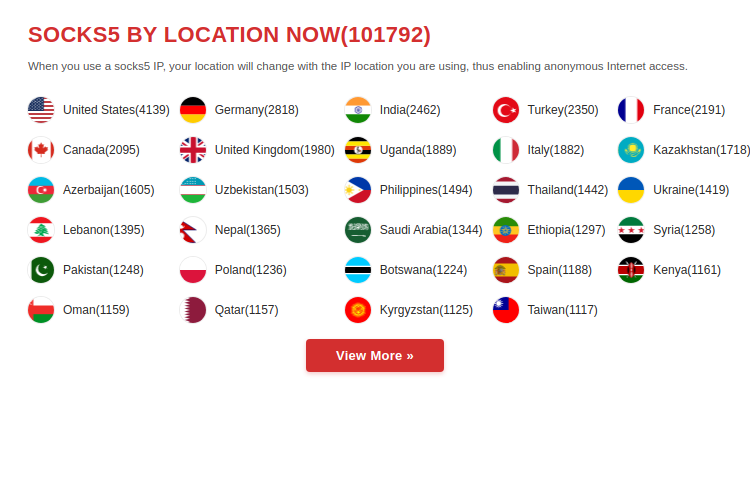
Here's how Vn5socks.net describes their own service:
What that translates to in practice: real residential IPs with wide country coverage, pricing that's a fraction of the tier-1 providers, and a dashboard that doesn't require an hour of onboarding. You buy, you get credentials, you plug into your anti-detect browser, you're live.
Setup friction is where most budget proxy providers fall apart — dashboards that fight you, authentication that breaks mid-session, country targeting that quietly falls back to neighboring regions. Vn5socks.net avoids all of that. Scaling from a single operator running 5 accounts to an agency running 500 is a pricing change, not a platform migration.
Best Use Cases
The obvious use case is warming up aged social accounts, but the full scope of where Vn5socks.net delivers is broader:
- Facebook Ads Manager operations — aged BM accounts, aged ad accounts, and ad account rentals all live or die on the IP layer. Residential is the minimum.
- Instagram mass warmup and growth — running 20 to 200 aged Instagram accounts from a single machine requires one residential IP per account, sticky for warmup, rotated only once seasoned.
- Large-scale web scraping — product data, SERP tracking, competitor monitoring, price intelligence. Datacenter IPs get blocked inside the first 1,000 requests; residential IPs scale to millions.
- Ad verification and competitor monitoring — seeing what creatives run in specific countries requires an IP in that country. Residential is the only way to view the real version of a competitor's campaign.
- Multi-account agency operations — client accounts, managed services, growth agencies. Every account in the stack needs its own IP, and the IP needs to hold up under long sessions and repeat logins.
 Multi-account operations at scale: each session routed through its own residential IP in the correct geo.
AccsZone + Vn5socks.net — The Complete Stack
Our position has always been that aged accounts are the foundation, but the foundation alone isn't a business. Aged accounts need infrastructure — proxies, browsers, workflows — to turn into revenue.
That's the logic behind this partnership. AccsZone supplies the accounts: aged Facebook, aged Instagram, ad-ready BMs, seasoned Gmails, and everything else in the stack. Vn5socks.net supplies the network layer that keeps those accounts alive past the first login. Combined, you've got the full pipeline from acquisition to long-term operation.
Professional operators don't source every piece of their stack from a single vendor. They pick best-in-class at each layer and stitch them together. We source accounts, they source IPs, and the combination is what separates operators who scale from the ones who burn through inventory every week.
Frequently Asked Questions
Can I use Vn5socks.net with aged Facebook and Instagram accounts?
Yes — this is one of the primary use cases. Residential IPs from Vn5socks.net route through real consumer ISPs, which is what Meta's risk engine expects to see for legitimate users. Pair each aged account with a sticky session IP from its origin country for the first 7–14 days.
Residential vs datacenter proxies — which is better for account management?
Residential, without exception, for aged or high-value accounts. Datacenter IPs are instantly recognized by Facebook, Instagram, LinkedIn, and Google because their ASNs are tagged as commercial hosting. Datacenter is fine only for basic scraping tasks where the target doesn't aggressively fingerprint.
How many accounts can I run per IP?
One account per sticky IP during warmup (first 7–14 days). Once accounts are seasoned, you can rotate IPs within a pool, but never stack multiple active sessions on the same IP simultaneously on platforms like Facebook or Instagram — that's the fastest way to cluster-ban an entire batch.
Do I need an anti-detect browser alongside Vn5socks.net?
Yes. A residential proxy fixes the network layer, but your browser still leaks a fingerprint (canvas, WebGL, timezone, screen resolution, fonts). Pair Vn5socks.net with Dolphin Anty, Undetectable, or a similar anti-detect browser for a complete isolation stack.
What countries does Vn5socks.net cover?
Wide global coverage across North America, Europe, Asia-Pacific, and Latin America. For specific country availability, check their live dashboard. If your aged account inventory is concentrated in specific geos, verify coverage before bulk ordering.
Is Vn5socks.net cheaper than tier-1 competitors?
Significantly. Vn5socks.net's per-GB pricing undercuts the tier-1 providers (Bright Data, Oxylabs, Smartproxy) while delivering comparable success rates on Facebook, Instagram, and LinkedIn in our six-week internal testing. For operators scaling past 50 accounts, the cost difference compounds quickly.
Ready to Keep Your Aged Accounts Alive?
If you're running aged accounts without residential proxies, you're leaving most of the account's value on the table. The math isn't close. Set up your residential plan with Vn5socks.net in about ten minutes — then pair it with aged inventory from AccsZone and follow the warmup playbook above.
Visit Vn5socks.net → Browse Aged FB Accounts Browse Aged IG Accounts